




Written by Hai Vaknin, Hoshea Yarden, Noam Pomerantz and Yehuda Smirnov
TL;DR
- Exclusion Paths Risk – Low-privileged users can access Microsoft Defender exclusion paths via Event Logs (Event 5007), exposing potential ‘safe’ zones for malware.
- New Method – We’ve found a way to identify exclusion paths using MpCmdRun.exe, even if event logs are unavailable / cleared, using a low-privileged user.
- SharpExclusionFinder – We created a C# tool that automates scanning for exclusion paths across the file system using this method.
- Defense Tip – Monitor unusual MpCmdRun.exe usage, especially repeated scans of different paths in a short time, to detect abuse.
Introduction
Recently, we raised an issue on X regarding how low-privileged users can access exclusion paths set in Microsoft Defender through Windows Event Logs:

This was highlighted on X by security researcher Hai Vaknin (member of Friends & Security), who demonstrated how event logs—specifically Event 5007—can reveal exclusion paths. These paths can provide attackers with a blueprint of AV ‘safe’ areas, potentially enabling malware to bypass scanning and security measures.
In this blog post, we will discuss a new method we’ve discovered that allows users to determine exclusion paths without relying on Windows Event Logs and without requiring administrative privileges. Unlike the previous technique, where access to exclusion paths depended on reviewing existing event logs, this new approach leverages the MpCmdRun.exe tool included with Microsoft Defender.
Additionally, we have developed a C# tool that automates the enumeration of exclusion paths across the entire file system using MpCmdRun.exe.
Using MpCmdRun.exe to Identify Exclusions
The tool that makes this possible is MpCmdRun.exe, which is the command-line utility included with Microsoft Defender.
How it works:
By using the MpCmdRun.exe utility in a specific way, you can test whether a folder is excluded from scanning.
& "C:\Program Files\Windows Defender\MpCmdRun.exe" -Scan -ScanType 3 -File "C:\folder_to_check\|*"
Explanation of the Command:
-scan: Initiates a scan using MpCmdRun.exe.-scantype 3: This parameter specifies a custom scan.-path "C:\folder_to_check|*": The pipe (|) is an invalid character in Windows folder names, ensuring that the path specified is not a valid folder or file. The asterisk (*) acts as a wildcard, essentially telling Defender to look for any potential subfolders or files within the specified path.
If the folder is excluded, the output will read “Scanning C:\folder_to_check\|* was skipped.”.
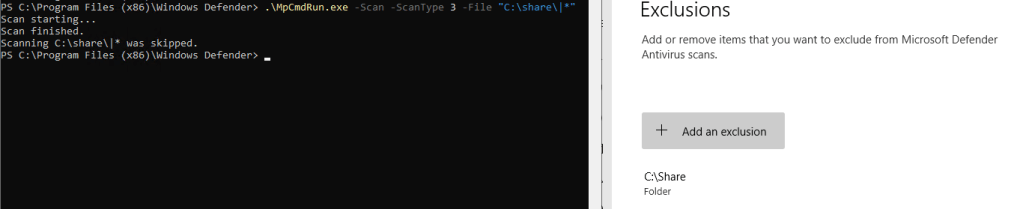
If the folder is not excluded, the system will return an error message stating “CmdTool: Failed with hr = 0x80508023. Check C:\Users\ADMINI~1\AppData\Local\Temp\MpCmdRun.log for more information” because of the invalid path created by the use of the “|*” syntax.

This method is effective because Microsoft Defender checks for exclusions before scanning files in the folder (which is beneficial for tools that need to run repeatedly without actually scanning files).
By utilizing the “|*” approach, Defender first verifies if the directory is on the exclusion list, since “|” is not a valid file or folder name (and therefore avoids a file scan even if the folder is not excluded).
SharpExclusionFinder
To streamline the process of identifying exclusion paths, we developed a tool written in C# that automates the entire process. This tool takes a base directory as input and recursively checks all subdirectories (or a given depth) using the MpCmdRun.exe method discussed earlier.
Github repo is here.
Tips for Defenders
- Minimize Exclusions: Limit the number of exclusion paths in Defender, and only exclude files or directories when absolutely necessary.
- Monitor for Unusual MpCmdRun.exe Usage Patterns: Track the frequency and variety of paths scanned by MpCmdRun.exe. If it’s executed multiple times within a short period with different paths each time, trigger an alert. Frequent or varied scans by the same user could indicate an attempt to enumerate exclusion paths.
Conclusion
Our research into Windows Defender has revealed another method that low-privileged users can use to identify exclusion paths – using the MpCmdRun.exe command-line utility.
In addition, we have developed a tool that automates the process of exclusion discovery across the file system, highlighting the ease with which an attacker could enumerate exclusion paths.






 Security Friends' Research Blog